SEO in Drupal: an introduction
Drupal is absolutely the best CMS platform when it comes to SEO, but our clients don't seem to be aware of this so we finally decided to break it down.

We are often asked by those who are new to Drupal (opens in a new tab) and familiar with WordPress (opens in a new tab) - “what SEO options are available?”. In order to answer this, we’ve put together an introduction to some of the SEO tools that are available for Drupal. We’re only really going to scratch the surface, but here’s a few things that Drupal can do for you to boost your rankings in search engine results.
Aggregation, minification and load orders
Aggregating and minifying stylesheets and scripts and having the option of choosing when to load external resources will rapidly increase your load speeds which is a key part of boosting your SEO. Search engines don’t look favourably upon websites which have high bounce rates caused by long load speeds and Google will specifically give you a page speed score based on how quickly your content loads so it’s essential to get this step right. Let’s take a closer look:
For starters Drupal comes with some core aggregation and caching options so right out of the box you’ve got some power.
 Image: Copyright Pivale Ltd. All rights reserved.
But if that doesn’t cut the mustard then there’s a great module plugin called Advanced Aggregation (opens in a new tab) or AdvAgg to those who don’t like syllables. Advanced aggregation comes with a huge variety of compression, minification and aggregation tools. As you can see from the screenshot below, even the general settings are pretty advanced.
 Image: Copyright Pivale Ltd. All rights reserved.
The AdvAgg Bundler allows you to combine CSS stylesheets and JS scripts to reduce the number of resources required to load a page. There are advanced settings for grouping logic and the bundler works intelligently, so if a single file (as requested in the screenshot below) cannot be achieved it will get as close to that number as possible.
 Image: Copyright Pivale Ltd. All rights reserved.
Javascript compression can drastically reduce load speeds. These settings allow you to minify and compress your js files, even to the fine tuning of removing licensing comments to save precious bytes!
 Image: Copyright Pivale Ltd. All rights reserved.
The modifications settings allow you to pre-process the javascript and css, changing their order and positions of importance, altering the perceived load times which in turn can drastically reduce bounce rates.
 Image: Copyright Pivale Ltd. All rights reserved.
Analytics Integration
Integrating Google Analytics (opens in a new tab) is key to monitoring your website’s performance and user journeys throughout your site. Luckily Drupal comes with some great analytics integration tools - of which we’ll very briefly mention just a few:
The Google Analytics integration is as simple as entering your Google “Property ID” or “UA” number and tweaking the domain settings if you desire.
 Image: Copyright Pivale Ltd. All rights reserved.
You can also use Google Tag Manager by entering your Container ID. Every Google tool has Drupal integration, as well as most of the other third party analytics and SEO management platforms.
 Image: Copyright Pivale Ltd. All rights reserved.
Perhaps you’re using a service like YoastSEO.js (opens in a new tab) or another real time SEO analysis tool? Drupal has the plugins and modules to make your life easier, right from within your own website.
 Image: Copyright Pivale Ltd. All rights reserved.
Pre launch SEO checklist
You’ve probably been here before; you’ve had a website built and you need to do come SEO preflight checks. This handy module will help you check off anything you may have missed.
Oh, of course! You chose Drupal, and there’s a module for that! Drupal’s SEO checklist (opens in a new tab) gives you an administrative area within your very own website to check all the SEO preflight tasks you could ever think of!
 Image: Copyright Pivale Ltd. All rights reserved.
Keyword analysis
You’ll need to check whether you’ve packed in those keywords in your content. Unless you love doing the Ctrl/Cmd + F or counting keywords by hand then you’ll need a tool to tell you about keyword density. As always, these tools are great, but are never a substitute for a comprehensive SEO strategy. Remember to always write content for your site visitors first and then optimise for search engines - not the other way round.
Drupal’s keyword research module (opens in a new tab) will give you a host of options to analyse your keyword usage.
 Image: Copyright Pivale Ltd. All rights reserved.
Link checker
Dead links will bring your site’s trust rating down. No one wants to be linked out of your site to a non-existent location! This tool automatically runs periodically and produces handy reports to highlight hidden broken link issue which you may not be aware of.
Of course, looking for dead links needn’t be a painful task, because Drupal has a module for that! Link Checker (opens in a new tab) allows you to quickly search for dead links and remove or amend them before the search engines give you a slap on the wrist.
 Image: Copyright Pivale Ltd. All rights reserved.
Meta tags
Meta tags are really important to your website’s SEO. They don’t just tell the search engines stuff about a page. They also tell a user. Search engines utilise meta tags to display particular information to users, and social media meta tags allow you to craft your content to specific platforms. Drupal has a vast and extensive meta tags module (opens in a new tab) which allows you to add everything from simple page titles to canonical URLS to geo-locations to search engine authentication codes.
Just see for yourself the extensive level of meta tagging you can get in to:


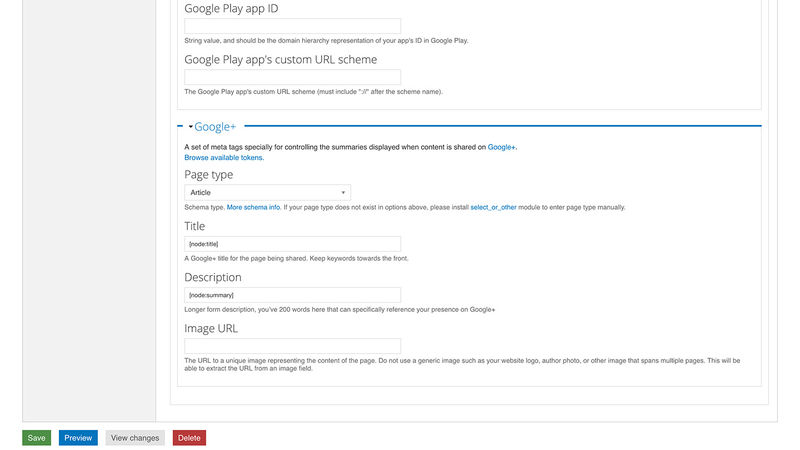
Image Optimisation
A website without images is like a guitar without strings, but a website without image optimisation is like watching paint dry. If your images aren’t compressed and optimised for serving up over slower internet connections you’re asking for trouble in the form of increased page bounce and decreased page speed score. Luckily Drupal has the most extensive image optimisation tools compared with other CMS platforms.
The image toolkit allows you to use free and open-source yet hugely powerful automated image manipulation tools like ImageAPI Optimize (opens in a new tab), ImageMagick (opens in a new tab) or GD2 toolkit (opens in a new tab). These tool kits can do everything from convert colour spaces to compressing jpeg data to removing white space from png files to converting to grayscale. The possibilities are endless.
 Image: Copyright Pivale Ltd. All rights reserved.
The command line JPEG compression tools allow you to crunch JPEGs to their absolute minimum file size without destroying the clarity of the image.
 Image: Copyright Pivale Ltd. All rights reserved.
And the same can be done with PNG images as well.
 Image: Copyright Pivale Ltd. All rights reserved.
XML Sitemap
An XML Sitemap (opens in a new tab) is a machine-readable list of links which can be submitted to search engines for listing. This gives you greater control over what you want the search engines to see and how much priority you want given to particular pages.
The sitemap settings give you the ultimate control over what is included and what priority each given content type should be given by default as well as providing clarity over the number of links belonging to each section or content type of your website.
 Image: Copyright Pivale Ltd. All rights reserved.
Is your SEO company requesting more than one sitemap? Drupal’s got you covered. You can break your sitemaps up in to sections or keep all your links in one sitemap.
 Image: Copyright Pivale Ltd. All rights reserved.
Every now and then a human might want to look at your sitemap. Luckily Drupal’s XML Sitemap comes with a handy human-readable stylesheet which presents the data in a readable format.
 Image: Copyright Pivale Ltd. All rights reserved.
Choose which search engines to submit your sitemap to and how often to re-submit it to keep your refresh profile up to date.
 Image: Copyright Pivale Ltd. All rights reserved.
URLs
Nobody wants to be thinking about, or worrying about URL patterns. That’s why Drupal comes with the tools to automate everything, however if you need to override a particular page URL you can set it to whatever you want.
Every piece of content has a system URL which gets assigned a URL alias automatically. You can amend a URL at the point of content creation or later by editing the URL alias. Edited URL aliases automatically redirect from the previous alias to the new one so you truly don’t have to worry about URL aliases.
 Image: Copyright Pivale Ltd. All rights reserved.
Defining patterns for URLs according to different content types is as simple as it looks. This will usually be done by us or your Drupal developer but the power is there for you too.
 Image: Copyright Pivale Ltd. All rights reserved.
Tweak your settings to remove any accidental nasties from URL aliases.
 Image: Copyright Pivale Ltd. All rights reserved.
Nobody likes unfriendly URLs - especially search engines - so tick this box and watch all your woes fade away!
 Image: Copyright Pivale Ltd. All rights reserved.
Need to add a manual redirect? No problem. Need to add a whole bunch? You can do this by importing a spreadsheet.
 Image: Copyright Pivale Ltd. All rights reserved.
Want to review all the redirects on your site? There’s an interface for that too!
 Image: Copyright Pivale Ltd. All rights reserved.
404 errors are the bane of an SEO conscious administrator’s existence. Well this nifty 404 counter will help you keep on top of these by adding redirects where appropriate.
 Image: Copyright Pivale Ltd. All rights reserved.
In conclusion
Is Drupal going to be able to handle your SEO requirements? We’d say you have all bases covered.
Is Drupal going to be as powerful as WordPress for my SEO profile? We’d say significantly more so.
Is Drupal the CMS for me if SEO is an absolute priority? We’d say it’s the best we’ve come across in any CMS.
If you’re interested in boosting your search engine visibility through a superior web platform and CMS then why not get in touch and let us know about your requirements.